VueFinder 4.4: what changed over the last three months
VueFinder 4.4: what changed over the last three months
VueFinder shipped a lot between 4.1 and 4.4 — some user-visible features, some plumbing. This post is a tour of everything that landed, with a "why this changed" lens rather than a raw changelog.
The Composable API architecture from 4.1 stayed intact; the rest got a serious round of features and polish on top of it.
Preview
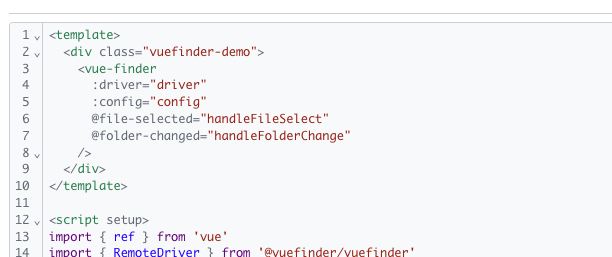
A real editor: CodeMirror 6 (lazy-loaded)
Text preview used to be a <pre> for viewing and a <textarea> for editing — opening a .json or .vue file gave you raw text with no help. 4.4 wires up CodeMirror 6:
- Syntax highlighting (json, js/ts/tsx/jsx, vue, html, css/scss, md, yaml, xml)
- Line numbers, fold gutter, bracket matching, undo/redo, find (Ctrl+F)
- Edit ↔ View toggled via a Compartment — the editor isn't recreated each time
The important part: CodeMirror does not ship in the main bundle. Dynamic import() splits it into its own chunk (~143 KB gzipped) that loads only when the user actually opens a text preview. Each language pack is its own lazy chunk too, loaded on demand for the matching extension. So you get a real editor experience without paying a Monaco-sized 2 MB tax.
Auto text detection broadened
.vue, .tsx, .sh, .toml, .dockerfile, and a bunch of others used to fall through to the "unknown type" Default preview. Now this set is recognised as text and routed to CodeMirror automatically:
vue, tsx, jsx, mjs, cjs, svelte, sh, bash, py, rb, php, go, rs,
java, kt, swift, c, h, cpp, cs, sql, graphql, toml, ini, conf,
env, dockerfile, gitignore, editorconfig, ...
Right-click → "Preview as ▸ Text / Image"
There are real cases where detection guesses wrong or the user wants to force a previewer: a log with a weird MIME, a binary that's actually an image. Right-click opens a submenu; the same options live in the File menu in the menubar.
To make this work I added submenu support to the context menu — previously a flat list. The same infrastructure is in place for grouping more menu items later (batch operations, developer tools).
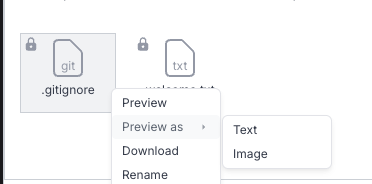
Table view for CSV / TSV
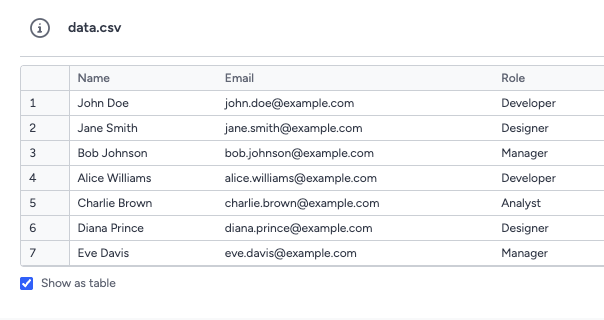
.csv and .tsv files still open as text by default (CodeMirror highlight and all), but the preview header has a small "Table" toggle right next to Edit. Click it and:
- Papaparse loads as a lazy chunk (delimiter auto-detected:
,;\t|) - The file renders as a real
<table>with a sticky header row and a sticky row-number column - Above 1000 rows you get a "showing first 1000" note — the raw view still has everything
Hitting Edit forces raw because you can't sensibly edit an HTML table. On Save it re-parses, so the table view stays consistent.
Image preview: zoom + pan

Image preview got zoom in / out / reset, mouse-wheel zoom, keyboard shortcuts (+ - 0), and pan (drag while zoomed). The zoom controls live as a small floating toolbar pinned to the bottom-right of the image instead of crowding the modal header.
Preview navigation, repositioned
The previous version had the prev/next arrows absolutely positioned inside the preview modal — they overlapped the content. Now:
- Desktop: fixed at the left/right edges of the viewport (outside the modal box, teleported to
body) - Mobile: grouped with Close in the footer as
[‹] [— Close —] [›]— the preview area is never covered
Loading indicator
The "Loading…" spinner used to fall into the document flow at the bottom-left of the modal — out of the way of where you were looking. It's now centered over the preview area inside a translucent chip so it's readable against any background.
Search
Sort results
The search modal options dropdown got a "Sort by" section: Name (A-Z / Z-A), Size, Date. The sort is scoped to search — your explorer's main sort is unaffected.
Folder results are now navigable
Finding a folder in search results used to only let you "Open Containing Folder" (i.e., go to its parent). Now:
- Double-click a folder result → navigate into the folder + close the modal
- The row's action menu shows "Open" for folders (and "Preview" for files)
Pin folders from search
On a storage with 50K folders, finding one by manually expanding the tree is hopeless. Search for it, hit Pin Folder from the row menu, and it shows up in the tree panel's "Pinned Folders" section immediately — one click away from then on. Pinned folders carry a small amber pin badge in search results so you can tell at a glance.
Stale-response cancellation
Rapid typing now aborts the previous in-flight search via AbortController, so a late-arriving response can't overwrite the results for what the user is currently typing.
File operations
Inline rename in the upload queue
Each row in the upload dialog has a pencil button — click it and the filename swaps for an editable input. Pending entries are renamed locally (removed from uppy and re-added with the new name at the same queue position). Completed entries hit adapter.rename against the upload target folder.
Under the hood there was a quiet data-loss bug in the incoming PR: if uppy rejected the new name — a restriction, a duplicate, anything — the file disappeared from the queue entirely. The merged version adds atomic recovery: on failure, the original entry is restored.
Target folder picker for archive / unarchive
Both modals now expose an inline tree-based folder picker. Default is the current folder (so existing behavior is unchanged), but the user can expand the picker and select a different destination. Frontend is wired; PHP backend support is on the follow-up list.
Filter-aware folder selection
In earlier versions, when selectionFilterType="files" was active, folders looked fully disabled — opacity 0.5, cursor: not-allowed, double-click blocked. Now:
- Folders are always interactive — double-click still navigates into them
- They just don't get added to the selection set, which is the actual point of the filter
- A single click on a folder clears the current selection (like clicking on empty space)
Appearance and behavior now match.
UI & behavior
Config persistence fix (#161)
The :config prop used to overwrite localStorage on every page load — change the view from grid to list, refresh, and you'd be back on grid. That defeated the entire point of the persistent atom.
A one-line fix in stores/config.ts reversed the merge order: the prop now acts as initial defaults, persisted values take precedence on reload. Settings actually stick across refreshes. To forcefully override the persisted value, use app.config.set(...) from the composable API.
Breadcrumb perf
On every path change the breadcrumb was rendering every item at full width first, then measuring widths and collapsing whatever overflowed into a dropdown. Each navigation produced a visible "show all then collapse" flash.
Fix: cache segment widths in a Map<basename, width>. On navigation, recompute the visible-item count synchronously from the cache — no intermediate render. The first time a basename is seen we fall back to the old measure-and-shrink path, but the measurement gets cached so the flash doesn't recur.
Internals
AbortSignal in the adapter API
The Adapter contract now accepts an optional signal?: AbortSignal on list / search / save / getContent. RemoteDriver forwards it to fetch; AdapterManager plumbs TanStack Query's queryFn context signal automatically and prefers an explicit caller signal when one is provided. Search modal is the first consumer — others can follow as use cases come up.
npm Trusted Publishing (OIDC)
Release flow now: gh release create vX.Y.Z → workflow fires → type-check + test + build + publish. No manual npm publish ever again.
CI gating
PRs and pushes now run Prettier + ESLint + type-check + vitest + build. Catches the kind of regressions that slipped past lint-only checks before (PR #164's dist-noise, accidental formatting drift, type errors in PRs).
Test infrastructure
Vuefinder.spec.ts had 13 pre-existing failures because the @nanostores/persistent mock didn't implement the listener API that @nanostores/vue's useStore calls. The mock now delegates to a real atom() from nanostores so the returned store actually behaves like the thing it's mocking. 19/19 passing again. Bonus: vitest bumped to 4.x (closing a critical CVE that was open at the time).
i18n
4.4.0 introduced ~27 new English strings (Sort by, Preview as, Table/Raw, Pin Folder, etc.). The 4.4.1 patch fills in translations for all 17 non-English locales. Every locale now reports 0 missing keys vs en.js.
What's next
A few notable items still on the roadmap:
- Inline preview for zip files (contents listing)
- Direct AWS S3 upload (presigned multipart)
- Signed-URL support for file display
- Extensible columns in the list view
And the broader architectural question: a real preview plugin architecture. Integrating CodeMirror sketched out half of the pattern (dynamic import + Suspense), but a proper registry/API would let zip viewers, three.js for .dwg/.dxf, and other previewers plug in cleanly. That's something to mature over the next few releases.
If you're already on VueFinder, npm install vuefinder@4.4.1 will pull the latest. Issues and feedback: github.com/n1crack/vuefinder. See you on the next release.