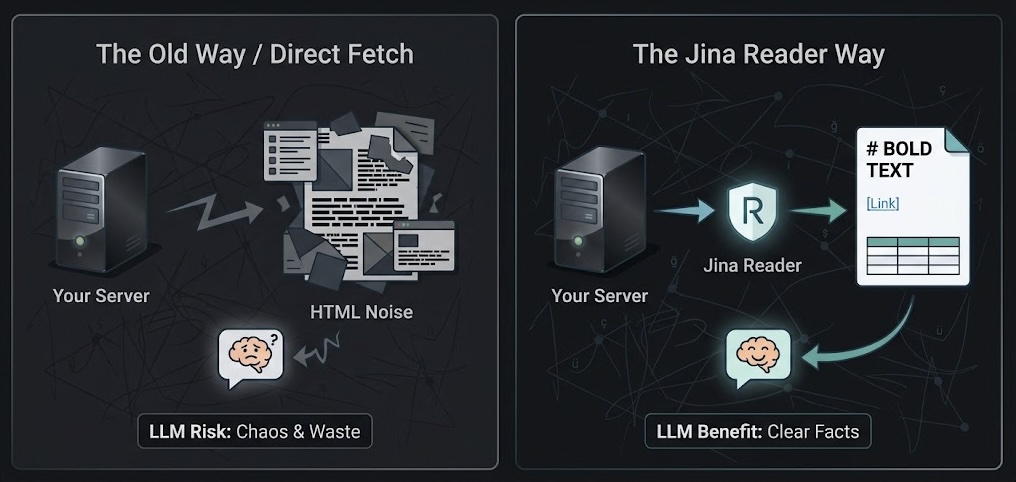
Jina Reader: clean input and SSRF protection when LLMs read pages
Jina Reader is a service that turns a web page into clean text an LLM can read. Using it takes one line: you put https://r.jina.ai/ in front of the address you want to read and get the page back as markdown. If you are building a pipeline, an agent or an n8n workflow that has an LLM read web pages, this post is for you. There are two good reasons to use it: the model gets cleaner input, and your server stays closed to the internal network.
How it works
The request carries the page's address as it is:
curl https://r.jina.ai/https://www.anthropic.com/claude-haiku-5-5
The response comes back as plain text. It starts with the page title, the source address and, if there is one, the publish date, followed by the content as markdown. Headings keep their # marks, links stay in [text](url) form and tables come back as markdown tables. Menus, sidebars and scripts are stripped out. You need no API key and no setup.
By default, Jina opens the page in a headless browser, a browser running without a screen. It extracts the text once the page's JavaScript has run. There is also a plain HTTP option that is faster but does not run JavaScript; you choose between them with the X-Engine header.
Reason one: clean input
When you fetch a page yourself, what you get is HTML. It contains menus, scripts, style definitions and tracking code. If you hand that to the model without cleaning it, most of the tokens go to noise. Cleaning it means writing separate rules for every site's structure.
One example makes the difference clear. Anthropic's Claude Haiku 5.5 announcement was 220,000 characters of raw HTML. The same page came back from Jina as 7,500 characters of clean text. The benchmark and pricing tables were kept as markdown tables too, so the model could read the figures straight from the table.
The difference is even larger on pages that load with JavaScript. On sites like Mastodon, the content is loaded by JavaScript after the page opens. When such a post is fetched directly, the HTML only gives you the title. Jina brings back the full text of the post.
This has a direct effect on the output. With only a title to go on, the model fills the gap with what it already knows. A text generated about Claude Haiku 5.5 named the model "Haiku 3.5", because the source gave it too little text. Given the page's actual content, the texts rely on concrete facts from the source such as price, speed and features.
Reason two: SSRF
In an LLM pipeline you usually do not pick the links yourself. They come from RSS feeds, from users or from another service. The one opening those links is your server. A server has an important property: it can reach internal addresses that nobody on the internet can. This weakness is called SSRF (Server-Side Request Forgery): getting a server to make a request on your behalf that it should not make.
How the problem arises
The internal addresses a server can reach include admin panels and databases and services on the same network. Most cloud servers also run a metadata service at 169.254.169.254. It returns information about the server and, depending on the setup, can return secrets as well.
If a link that looks harmless from the outside resolves to one of these addresses, the chain runs like this:
flowchart LR
    Feed[Feed link] --> Server[Your server]
    Server --> Internal[Internal address: panel, metadata]
    Internal --> Server
    Server --> LLM[LLM]
    LLM --> Output[Generated draft]
The information at the internal address goes first to your server, then to the LLM and from there into the text you generate. A single malicious link is enough for data about your server to show up inside a draft.
Real cases
The best-known case is the 2019 Capital One breach. An attacker got a misconfigured web application firewall running on AWS to send a request to the metadata address. With the temporary credentials it returned, the attacker reached files on S3 and downloaded around 100 million customer records.
LLM agents reproduce the same weakness, because the tools they use to read web pages are often written without these checks. In 2026 a CVE (CVE-2026-40150) was published for the web_crawl function of the PraisonAIAgents library. The function did not check whether an address belonged to the internal network before fetching it, so requests could be made to the metadata address and to internal services. Agents carry one more risk: instructions hidden inside a page they read, known as prompt injection, can steer them into opening such internal addresses.
Why a URL check is not enough
The first fix that comes to mind is to check the address before opening the link. Blocking obviously internal addresses like localhost, 127.0.0.1 and 192.168.x.x is easy. A simple check catches all of them.
But that check looks at the address written in the link. It cannot see which IP a harmless-looking domain resolves to. If an attacker points their own domain at an internal IP, the check does not notice. It is also possible to change the DNS record after the check and send the request to an internal address. This technique is called DNS rebinding. If the check runs somewhere that cannot make DNS queries, such as an n8n Code node, there is no way to close this gap there.
What changes with Jina
With Jina, your server never connects to the link from the feed. It only sends requests to one fixed address, r.jina.ai. Jina's server is the one opening the link, and it has no access to your internal network. Jina also rejects requests to internal addresses on its own side. When a request is sent to the metadata address, Jina turns it down with "Request to localhost or non-public IP".
It is still worth keeping the URL check in place. It works as a second layer and never sends obviously internal addresses to Jina at all.
Limits
The pages you read pass through a third-party service. For public news pages that is not a problem. For pages behind a login or internal company pages, you should not use Jina.
Without a key, the limit is 20 requests per minute. With a free key from Jina it goes up to 200 per minute, and paid plans go beyond that. A pipeline that reads a few dozen pages a day stays far below the limit.
You become dependent on Jina. If the service slows down or goes away, the page-reading step fails. That is why it is a good idea to let the pipeline carry on with the title and summary when reading fails.
The classic fix still applies: block internal address ranges and the metadata address for the server's outgoing traffic with a firewall rule. It gives the same protection without depending on Jina. In a setup like Docker with Coolify, the rule has to be written carefully against the container network, because a wrong rule can also cut the application off from its own database. If you are on AWS, enforcing IMDSv2 on the metadata service helps too. IMDSv2 first asks for a session token, which only a PUT request with a special header can obtain. Simple SSRF flaws can usually only send GET requests.
Which one to pick
| Scenario | First choice | Alternative |
|---|---|---|
| Having an LLM read public pages | Jina Reader | Direct fetch plus a firewall |
| Pages behind a login or internal pages | Direct fetch inside your network | — |
| Hundreds of pages per minute | Your own reader plus a firewall | Jina's paid plan |